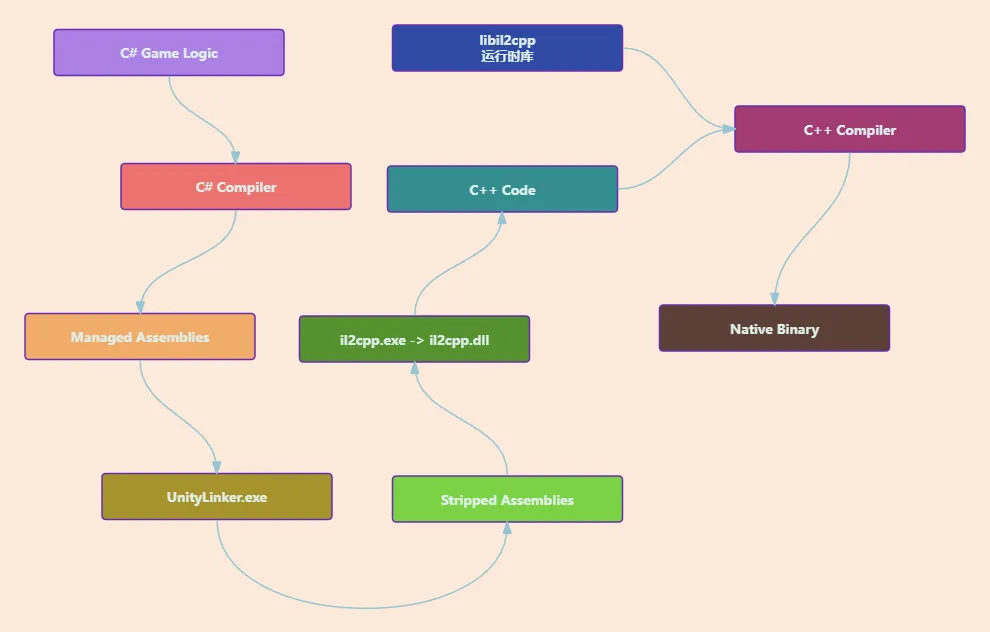
自从Unity6开始官方就支持IL2CPP堆栈打印出具体行号 : https://docs.unity3d.com/6000.1/Documentation/Manual/il2cpp-managed-stack-traces.html
符号表
在开始之前我们先了解一下符号表是个什么东西
一、符号表(Symbol Table) 符号表是编译器/链接器生成的数据结构,存储标识符(变量、函数、类等)的元信息,用于编译、链接和调试。
核心作用 :
编译阶段 :语义检查(类型匹配、作用域验证)。链接阶段 :解析跨模块的符号引用(地址重定位)。调试阶段 :映射机器码到源代码(变量名、函数名、行号)。
符号类型 :
类型 示例 存储位置
全局符号
int global_var;.data/.bss
函数符号
void func() {}.text
局部静态符号
static int local_static;.data/.bss
类型信息
class MyClass;调试段(如.debug_info)
工具与操作 :
查看符号表 :1 2 3 nm -C a.out readelf -s a.out objdump -t a.out
名称修饰(Name Mangling) :void Foo(int)编译为类似_Z3Fooi的符号,通过c++filt解析:剥离符号表 (发布优化):
调试符号格式 :
DWARF (Linux/Unix):.debug_info、.debug_line等段存储源码映射。PDB (Windows):独立文件(.pdb)存储调试信息。
二、内存转储(Memory Dump) 内存转储是程序运行时内存状态的快照,用于分析崩溃或异常。
核心转储(Core Dump) :
触发场景 :段错误(SIGSEGV)、手动触发(gcore)。生成配置 :1 2 ulimit -c unlimited echo "/tmp/core.%t" > /proc/sys/kernel/core_pattern
分析工具 :
1 2 3 4 gdb ./executable core_file (gdb) bt (gdb) print variable (gdb) x/8xw address
手动转储 :
代码中生成 :1 2 3 4 #include <cstdlib> void GenerateDump () system ("gcore <pid>" ); }
GDB 命令 :1 (gdb) generate-core-file
三、行号(Line Numbers) 行号信息关联机器指令与源代码位置,是调试的核心。
生成与存储 :
编译时添加 -g 选项(GCC/Clang):1 g++ -g -O0 main.cpp -o prog
DWARF 段 :
.debug_line:指令地址 ↔ 源文件行号的映射。.debug_info:类型、变量结构信息。
工具应用 :
反汇编与行号 :地址转行号 :1 addr2line -e ./prog 0x401000
GDB 行号操作 :1 2 (gdb) list main.c:15 (gdb) break main.c:20
四、调试(Debug) 综合符号表、行号与内存分析进行问题定位。
调试器工作流(GDB) :
1 2 3 4 5 6 7 8 gdb ./prog (gdb) break main (gdb) run (gdb) next (gdb) step (gdb) watch variable (gdb) info locals (gdb) frame 2
多线程调试 :
1 2 3 (gdb) info threads (gdb) thread 3 (gdb) break foo thread 2
内存泄漏检测工具 :
Valgrind :1 valgrind --leak-check=full ./prog
报告未释放内存(definitely lost)。
检测越界访问(Invalid read/write)。
高级调试技术 :
条件断点 :反向调试 (GDB 7.0+):1 2 (gdb) record (gdb) reverse-step
总结 :gcc/gdb/valgrind/objdump)是C++开发者诊断复杂问题的核心能力。
Unity符号对应关系分析
本来想写的,发现网上已经有文章了,而且还很详细: https://zhuanlan.zhihu.com/p/132717069
Unity IL2CPP构建流程分析
大体构建过程可以参考: https://www.lfzxb.top/il2cpp-code-gen/ https://www.52pojie.cn/forum.php?mod=viewthread&tid=2032638&highlight=mcp
C++符号表,Windows为GameAssembly.pdb,Android为libil2cpp.dbg.so ,IOS为UnityFramework.framework.dSYM
通过IL2CPP转义的C++源码以及一个记录了C++到C#行号映射的LineNumberMappings.json文件
实现基于Unity2022及其之前版本的C#行号恢复功能
首先,如果图方便,完全可以将我们这部分构建出的il2cpp.usym随包发布,Unity会自动读取这个符号表,并实现行号转换
1 2 3 Exception: !!!!!!!!! DefaultNamespace.IL2CPP_NO_MONO.TestGenericMethod[T] (T value ) (at I:/TestProject/My project/Assets/IL2CPP_NO_MONO.cs:20 )
但个人并不推荐这个做法,原因有二
性能问题,一旦有了符号表,在生成堆栈的时候Unity会多一些查找和构造对象操作,会造成一些性能和内存问题,虽然不多
安全问题,毕竟这个符号表相当于包含了所有反汇编所需要的信息,有心者完全可以在il2cpp dump之后,写一个自动化工具,结合反编译的C++,C#和GlobalMetaData最大限度还原整个游戏的所有逻辑。不过这个倒是其次,毕竟大家平时在写什么代码自己心里有数
il2cpp源码更改
il2cpp本身也并没有输出函数地址的逻辑,所以我们需要做更改 Unity安装目录/Data/il2cpp/libil2cpp/icalls/mscorlib/System.Diagnostics/StackTrace.cpp ,使得异常堆栈会输出一个地址:
1 2 3 4 5 6 7 8 9 10 11 12 13 14 15 16 17 18 19 20 21 22 23 24 25 26 27 28 29 30 31 32 33 34 35 36 37 38 39 40 41 42 43 44 45 46 47 48 49 50 51 52 53 54 55 56 57 58 59 60 61 62 63 64 65 66 67 68 69 70 #if !IL2CPP_TINY #include "il2cpp-config.h" #include "il2cpp-class-internals.h" #include "il2cpp-object-internals.h" #include "gc/WriteBarrier.h" #include "vm/Array.h" #include "vm/Object.h" #include "vm/Reflection.h" #include "icalls/mscorlib/System.Diagnostics/StackTrace.h" #include "vm-utils/DebugSymbolReader.h" #include "vm/String.h" namespace il2cpp{ namespace icalls{ namespace mscorlib{ namespace System{ namespace Diagnostics{ static Il2CppArray* GetTraceInternal (Il2CppException* exc, int32_t skip, bool need_file_info) { Il2CppArray* trace_ips = exc->trace_ips; Il2CppArray* nativetrace_ips = exc->native_trace_ips; if (trace_ips == NULL ) return vm::Array::New (il2cpp_defaults.stack_frame_class, 0 ); int len = vm::Array::GetLength (trace_ips); Il2CppArray* stackFrames = vm::Array::New (il2cpp_defaults.stack_frame_class, len > skip ? len - skip : 0 ); for (int i = skip; i < len; i++) { Il2CppStackFrame* stackFrame = NULL ; if (utils::DebugSymbolReader::DebugSymbolsAvailable ()) { stackFrame = il2cpp_array_get (trace_ips, Il2CppStackFrame*, i); } else { stackFrame = (Il2CppStackFrame*)vm::Object::New (il2cpp_defaults.stack_frame_class); MethodInfo* method = il2cpp_array_get (trace_ips, MethodInfo*, i); IL2CPP_OBJECT_SETREF (stackFrame, method, vm::Reflection::GetMethodObject (method, NULL )); uintptr_t fileNamePtr = il2cpp_array_get (nativetrace_ips, uintptr_t , i); char buffer[32 ]; snprintf (buffer, sizeof (buffer), "0x%x" , fileNamePtr); stackFrame->filename = il2cpp::vm::String::New (buffer); } il2cpp_array_setref (stackFrames, i, stackFrame); } return stackFrames; } Il2CppArray* StackTrace::get_trace (Il2CppException *exc, int32_t skip, bool need_file_info) { return GetTraceInternal (exc, skip, need_file_info); } } } } } } #endif
然后我们就可以发现异常堆栈会从这样:
1 2 3 4 Exception: !!!!!!!!! DefaultNamespace.IL2CPP_NO_MONO.TestGenericMethod[T] (T value ) (at 000000000000000000000 :0 ) IL2CPP_HOTFIX.Start () (at 00000000000000000 :0 )
变成这样:
1 2 3 Exception: !!!!!!!!! DefaultNamespace.IL2CPP_NO_MONO.TestGenericMethod[T] (T value ) (at 0x1eec90e :0 ) IL2CPP_HOTFIX.Start () (at 0x17f703e :0 )
经过测试,只有Unity6版本的usymtool可以正常输出可用的il2cpp.usym文件,所以建议从Unity6复制一份usymtool到项目中
C++符号表位置
Windows
Library/Bee/artifacts/WinPlayerBuildProgram,由于机器环境不同,最终会生成在一个带有随机编码的文件夹中,问题不大,直接通过C#脚本搜索即可
Android
Library/Bee/artifacts/Android,同Windows
IOS
IOS就比较特殊一些,因为Unity并不会直接构建最终的IOS应用,而是通过xcode构建最终产物,经过测试,IOS的符号表会位于:/Users/username/Library/Developer/Xcode/DerivedData/Unity-iPhone-btwqofoxzceueqbjidljtygpwlpq/Build/Products/ReleaseForRunning-iphoneos/UnityFramework.framework.dSYM 下,这是一个中间产物目录,DerivedData中
构建il2cpp.usym
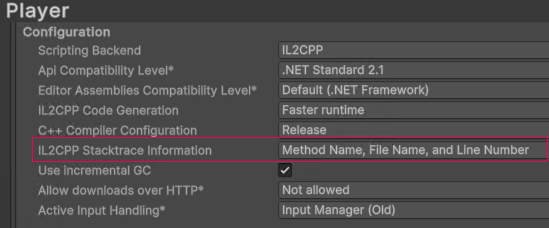
上面提到符号表的构建依赖于行号信息,需要在构建前开启:
1 2 3 4 5 6 7 8 9 10 11 12 13 14 15 16 17 18 19 20 21 using UnityEditor; using UnityEditor.Build; using UnityEditor.Build.Reporting; namespace Editor { public class UsymPreprocessor : IPreprocessBuildWithReport { public int callbackOrder { get { return 0 ; } } public void OnPreprocessBuild (BuildReport report ) { string addlArgs = "--emit-source-mapping" ; UnityEngine.Debug.Log( $"Setting Additional IL2CPP Args = \"{addlArgs} \" for platform {report.summary.platform} " ); PlayerSettings.SetAdditionalIl2CppArgs(addlArgs); } } }
Windows && Android
直接将下面这个脚本复制到项目即可,打包结束后会自动构建il2cpp.usym文件,并复制到 Logs/USYMTemp 下
1 2 3 4 5 6 7 8 9 10 11 12 13 14 15 16 17 18 19 20 21 22 23 24 25 26 27 28 29 30 31 32 33 34 35 36 37 38 39 40 41 42 43 44 45 46 47 48 49 50 51 52 53 54 55 56 57 58 59 60 61 62 63 64 65 66 67 68 69 70 71 72 73 74 75 76 77 78 79 80 81 82 83 84 85 86 87 88 89 90 91 92 93 94 95 96 97 98 99 100 101 102 103 104 105 106 107 108 109 110 111 112 113 114 115 116 117 118 119 120 121 122 123 124 125 126 127 128 129 130 131 132 133 134 135 136 137 138 139 140 141 142 143 144 145 146 147 148 149 150 151 152 153 154 155 156 157 158 159 160 161 162 163 164 165 166 167 168 169 170 171 172 173 174 175 176 177 178 179 180 181 182 183 184 185 186 187 188 189 190 191 192 193 194 195 196 197 198 199 200 201 202 203 204 205 206 207 208 209 210 211 212 213 214 215 216 217 218 219 220 221 222 223 224 225 226 227 228 229 230 231 232 233 234 235 236 237 238 239 240 241 242 243 244 245 246 247 248 249 250 251 252 253 254 255 256 257 258 259 260 261 262 263 264 265 266 267 268 269 270 271 272 273 274 275 276 277 278 279 280 281 282 283 284 285 286 287 288 289 290 291 292 293 294 295 296 297 298 299 300 301 302 303 304 305 306 307 308 309 310 311 312 313 314 315 316 317 318 319 320 321 322 323 324 325 326 327 328 329 330 331 332 333 334 335 336 337 338 339 340 341 342 343 344 345 346 347 348 349 350 351 352 353 354 355 356 357 358 359 360 361 362 363 364 365 366 367 368 369 370 371 372 373 374 375 376 377 378 379 380 381 382 383 384 385 386 387 388 389 390 391 392 393 394 395 396 397 398 399 400 401 402 403 404 405 406 407 408 409 410 411 412 413 414 415 416 417 418 419 420 421 422 423 424 using UnityEngine; using UnityEditor; using UnityEditor.Build; using UnityEditor.Build.Reporting; using System.IO; using System.Diagnostics; using System.Linq; public class UsymPostProcessor : IPostprocessBuildWithReport { public int callbackOrder => 0 ; private const bool AUTO_COPY_TO_OUTPUT = true ; private const int PROCESS_TIMEOUT_MS = 300000 ; private const string LOG_PREFIX = "UsymPostProcessor" ; public void OnPostprocessBuild (BuildReport report ) { if (report.summary.platform != BuildTarget.StandaloneWindows64 && report.summary.platform != BuildTarget.StandaloneWindows && report.summary.platform != BuildTarget.Android) { UnityEngine.Debug.Log("UsymPostProcessor: 仅支持Windows和Android平台" ); return ; } UnityEngine.Debug.Log("UsymPostProcessor: 开始生成符号文件..." ); try { GenerateUsymFile(report); } catch (System.Exception ex) { UnityEngine.Debug.LogError($"UsymPostProcessor: 生成符号文件失败: {ex.Message} " ); } } private void GenerateUsymFile (BuildReport report ) { var stopwatch = System.Diagnostics.Stopwatch.StartNew(); try { LogInfo($"Unity版本: {Application.unityVersion} " ); LogInfo($"构建平台: {report.summary.platform} " ); string editorPath = EditorApplication.applicationPath; string editorFolder = Path.GetDirectoryName(editorPath); string usymToolPath = Path.GetFullPath(Path.Combine(Application.dataPath, ".." , "tools" , "il2cpp_usym_gen" , "usymtool.exe" )); if (!File.Exists(usymToolPath)) { LogError($"找不到usymtool.exe: {usymToolPath} " ); LogInfo("请确保使用的Unity版本支持usymtool工具" ); return ; } LogInfo($"找到usymtool: {usymToolPath} " ); string buildOutputPath = report.summary.outputPath; string buildDirectory = Path.GetDirectoryName(buildOutputPath); string projectName = Path.GetFileNameWithoutExtension(buildOutputPath); LogInfo($"构建输出路径: {buildOutputPath} " ); string libraryPath = Path.GetFullPath(Path.Combine(Application.dataPath, ".." , "Library" )); string beePath = GetBeeArtifactsPath(libraryPath, report.summary.platform); LogInfo($"搜索路径: {beePath} " ); string symbolFilePath = FindSymbolFile(beePath, report.summary.platform); if (symbolFilePath == null ) { string expectedFile = report.summary.platform == BuildTarget.Android ? "libil2cpp.dbg.so" : "GameAssembly.pdb" ; LogError($"找不到符号文件 {expectedFile} ,请确保构建类型为Release或包含调试信息" ); return ; } string il2cppOutputPath = Path.Combine(beePath, "il2cppOutput" , "cpp" ); if (!Directory.Exists(il2cppOutputPath)) { il2cppOutputPath = FindIl2CppOutputPath(beePath); if (il2cppOutputPath == null ) { LogError("找不到IL2CPP输出目录,请确保IL2CPP构建已完成" ); return ; } } string usymOutputPath = Path.Combine(beePath, "il2cppOutput" , "build" , "il2cpp.usym" ); string arguments = $"-localFile \"{symbolFilePath} \" " + $"-usymOutputPath \"{usymOutputPath} \" " + $"-il2cppOutputPath \"{il2cppOutputPath} \" " + $"-il2cppFileRoot \"{il2cppOutputPath} \" " + "-lite -allowMissingBuildId" ; LogInfo($"执行命令: \"{usymToolPath} \" {arguments} " ); if (!ExecuteUsymTool(usymToolPath, arguments, usymOutputPath, buildDirectory, projectName, report.summary.platform)) { LogError("usymtool执行失败,请检查上述错误信息" ); return ; } stopwatch.Stop(); LogInfo($"符号文件生成完成,耗时: {stopwatch.ElapsedMilliseconds} ms" ); } catch (System.Exception ex) { stopwatch.Stop(); LogError($"处理过程中发生异常: {ex} " ); } } private bool ExecuteUsymTool (string usymToolPath, string arguments, string usymOutputPath, string buildDirectory, string projectName, BuildTarget platform { try { ProcessStartInfo startInfo = new ProcessStartInfo { FileName = usymToolPath, Arguments = arguments, UseShellExecute = false , RedirectStandardOutput = true , RedirectStandardError = true , CreateNoWindow = true }; var processStopwatch = System.Diagnostics.Stopwatch.StartNew(); using (Process process = Process.Start(startInfo)) { if (process == null ) { LogError("无法启动usymtool进程" ); return false ; } if (!process.WaitForExit(PROCESS_TIMEOUT_MS)) { LogError($"usymtool执行超时(超过{PROCESS_TIMEOUT_MS / 1000 } 秒),强制终止进程" ); process.Kill(); return false ; } processStopwatch.Stop(); string output = process.StandardOutput.ReadToEnd(); string error = process.StandardError.ReadToEnd(); LogInfo($"usymtool执行耗时: {processStopwatch.ElapsedMilliseconds} ms" ); if (process.ExitCode == 0 ) { LogInfo($"符号文件生成成功: {usymOutputPath} " ); if (!string .IsNullOrEmpty(output)) { LogInfo($"usymtool输出: {output} " ); } if (File.Exists(usymOutputPath)) { var fileInfo = new FileInfo(usymOutputPath); LogInfo($"符号文件大小: {fileInfo.Length} bytes" ); } else { LogWarning($"符号文件未生成: {usymOutputPath} " ); } if (AUTO_COPY_TO_OUTPUT) { CopyUsymToOutput(usymOutputPath, buildDirectory, projectName, platform); } return true ; } else { LogError($"usymtool执行失败 (退出代码: {process.ExitCode} )" ); if (!string .IsNullOrEmpty(error)) { LogError($"错误信息: {error} " ); } if (!string .IsNullOrEmpty(output)) { LogInfo($"输出信息: {output} " ); } return false ; } } } catch (System.Exception ex) { LogError($"执行usymtool时发生异常: {ex.Message} " ); return false ; } } private void CopyUsymToOutput (string usymPath, string buildDirectory, string projectName, BuildTarget platform { if (!File.Exists(usymPath)) { LogWarning("符号文件不存在,跳过复制" ); return ; } try { string targetPath = Path.GetFullPath(Path.Combine(Application.dataPath, ".." , "Logs" , "USYMTemp" , "il2cpp.usym" )); string targetDirectory = Path.GetDirectoryName(targetPath); if (!Directory.Exists(targetDirectory)) { Directory.CreateDirectory(targetDirectory); LogInfo($"创建目录: {targetDirectory} " ); } File.Copy(usymPath, targetPath, true ); LogInfo($"符号文件已复制到: {targetPath} " ); if (File.Exists(targetPath)) { var fileInfo = new FileInfo(targetPath); LogInfo($"复制的符号文件大小: {fileInfo.Length} bytes" ); } } catch (System.Exception ex) { LogWarning($"复制符号文件失败: {ex.Message} " ); } } private string GetBeeArtifactsPath (string libraryPath, BuildTarget platform { string buildProgram; switch (platform) { case BuildTarget.StandaloneWindows: case BuildTarget.StandaloneWindows64: buildProgram = "WinPlayerBuildProgram" ; break ; case BuildTarget.Android: buildProgram = "Android" ; break ; default : LogWarning($"不支持的平台: {platform} " ); buildProgram = "WinPlayerBuildProgram" ; break ; } return Path.Combine(libraryPath, "Bee" , "artifacts" , buildProgram); } private string FindSymbolFile (string beePath, BuildTarget platform { string fileName; string description; switch (platform) { case BuildTarget.StandaloneWindows: case BuildTarget.StandaloneWindows64: fileName = "GameAssembly.pdb" ; description = "Windows符号文件" ; break ; case BuildTarget.Android: fileName = "libil2cpp.dbg.so" ; description = "Android调试符号文件" ; break ; default : LogWarning($"不支持的平台符号文件查找: {platform} " ); return null ; } try { if (!Directory.Exists(beePath)) { LogWarning($"Bee路径不存在: {beePath} " ); return null ; } LogInfo($"搜索{description} : {fileName} " ); string [] symbolFiles = Directory.GetFiles(beePath, fileName, SearchOption.AllDirectories); LogInfo($"找到 {symbolFiles.Length} 个{fileName} 文件" ); if (symbolFiles.Length > 0 ) { var latestSymbolFile = symbolFiles .Select(file => new { Path = file , ModifiedTime = File.GetLastWriteTime(file ) }) .OrderByDescending(x => x.ModifiedTime) .First(); LogInfo($"找到{description} : {latestSymbolFile.Path} (修改时间: {latestSymbolFile.ModifiedTime} )" ); return latestSymbolFile.Path; } LogWarning($"在Bee artifacts中未找到{fileName} 文件" ); return null ; } catch (System.Exception ex) { LogError($"搜索{description} 时出错: {ex.Message} " ); return null ; } } private string FindGameAssemblyPdb (string beePath { try { if (!Directory.Exists(beePath)) { LogWarning($"Bee路径不存在: {beePath} " ); return null ; } LogInfo($"搜索GameAssembly.pdb文件..." ); string [] pdbFiles = Directory.GetFiles(beePath, "GameAssembly.pdb" , SearchOption.AllDirectories); LogInfo($"找到 {pdbFiles.Length} 个GameAssembly.pdb文件" ); if (pdbFiles.Length > 0 ) { var latestPdb = pdbFiles .Select(file => new { Path = file , ModifiedTime = File.GetLastWriteTime(file ) }) .OrderByDescending(x => x.ModifiedTime) .First(); LogInfo($"找到GameAssembly.pdb: {latestPdb.Path} (修改时间: {latestPdb.ModifiedTime} )" ); return latestPdb.Path; } LogWarning("在Bee artifacts中未找到GameAssembly.pdb文件" ); return null ; } catch (System.Exception ex) { LogError($"搜索GameAssembly.pdb时出错: {ex.Message} " ); return null ; } } private string FindIl2CppOutputPath (string beePath { try { if (!Directory.Exists(beePath)) { LogWarning($"Bee路径不存在: {beePath} " ); return null ; } LogInfo("搜索IL2CPP输出路径..." ); string [] possiblePaths = { "il2cppOutput/cpp" , "il2cppOutput" , "Il2CppOutputProject/Source/il2cppOutput/cpp" , "Il2CppOutputProject/Source" }; foreach (string possiblePath in possiblePaths) { string fullPath = Path.Combine(beePath, possiblePath); if (Directory.Exists(fullPath)) { LogInfo($"找到IL2CPP输出路径: {fullPath} " ); return fullPath; } } LogInfo("在预定义路径中未找到,尝试搜索il2cpp目录..." ); var il2cppDirs = Directory.GetDirectories(beePath, "*il2cpp*" , SearchOption.AllDirectories); LogInfo($"找到 {il2cppDirs.Length} 个il2cpp相关目录" ); foreach (string dir in il2cppDirs) { var cppFiles = Directory.GetFiles(dir, "*.cpp" , SearchOption.TopDirectoryOnly); if (cppFiles.Length > 0 ) { LogInfo($"找到IL2CPP输出路径: {dir} (包含 {cppFiles.Length} 个cpp文件)" ); return dir; } } LogWarning("未找到IL2CPP输出路径" ); return null ; } catch (System.Exception ex) { LogError($"搜索IL2CPP输出路径时出错: {ex.Message} " ); return null ; } } private void LogInfo (string message { UnityEngine.Debug.Log($"{LOG_PREFIX} : {message} " ); } private void LogWarning (string message { UnityEngine.Debug.LogWarning($"{LOG_PREFIX} : {message} " ); } private void LogError (string message { UnityEngine.Debug.LogError($"{LOG_PREFIX} : {message} " ); } }
IOS
两种方案:
更改xcode工程脚本,实现自动化
通过后处理的方式,修改CI流水线,不修改已有xcode工程,保证稳定
更改xcode工程脚本,实现自动化
在xcode构建完毕后执行此脚本,注意传递相应的环境变量
1 2 3 4 5 6 7 8 9 10 11 12 13 # !/bin/sh # process_symbols_il2cpp # if [ "$(arch)" == "arm64" ]; then usymtool="usymtoolarm64" else usymtool="usymtool" fi "$PROJECT_DIR/$usymtool" -localFile "$DWARF_DSYM_FOLDER_PATH/$DWARF_DSYM_FILE_NAME/Contents/Resources/DWARF/UnityFramework" -il2cppOutputPath "$PROJECT_DIR/Il2CppOutputProject/Source/il2cppOutput/" -il2cppFileRoot "$PROJECT_DIR/Il2CppOutputProject/Source/il2cppOutput/" -lite -usymOutputPath "$PROJECT_DIR/Data/Managed/il2cpp.usym"
追求自动化的话,可以更改xcode工程的配置(通过C#),在Build Phases栏目有个Run Scripts选项,将脚本复制进去即可
修改CI流水线
或者也可以可以参考Unity6导出的xcode工程,在构建完毕后,我们在Build Log里可以找到类似Log:
1 2 3 4 5 6 7 8 9 10 11 12 13 14 15 16 17 18 19 20 21 22 23 24 25 26 27 28 29 30 31 32 33 34 35 36 37 Showing Recent Messages time="2025-08-05T10:11:22+08:00" level=info msg="Running Usymtool..." time="2025-08-05T10:11:22+08:00" level=info msg="Command line: /Users/username/testil2cpp/release/newrelrease/usymtoolarm64 -localFile /Users/username/Library/Developer/Xcode/DerivedData/Unity-iPhone-btwqofoxzceueqbjidljtygpwlpq/Build/Products/ReleaseForRunning-iphoneos/UnityFramework.framework.dSYM/Contents/Resources/DWARF/UnityFramework -il2cppOutputPath /Users/username/testil2cpp/release/newrelrease/Il2CppOutputProject/Source/il2cppOutput/ -il2cppFileRoot /Users/username/testil2cpp/release/newrelrease/Il2CppOutputProject/Source/il2cppOutput/ -lite -usymOutputPath /Users/username/testil2cpp/release/newrelrease/Data/Managed/il2cpp.usym" // 如果是M系列芯片,则是usymtoolarm64,否则是正常usymtool time="2025-08-05T10:11:22+08:00" level=info msg="Usymtool executable path: /Users/username/testil2cpp/release/newrelrease/usymtoolarm64" time="2025-08-05T10:11:22+08:00" level=info msg="Usymtool OS/Arch: darwin/arm64" time="2025-08-05T10:11:22+08:00" level=info msg="Working directory: /Users/username/testil2cpp/release/newrelrease" time="2025-08-05T10:11:22+08:00" level=info msg="Log file path: /Users/username/Library/Logs/Unity/symbol_upload.log" time="2025-08-05T10:11:22+08:00" level=info msg="LZMA_PATH: /Users/username/testil2cpp/release/newrelrease/lzma" time="2025-08-05T10:11:22+08:00" level=info msg="USYM_UPLOAD_URL_SOURCE: http://localhost:8080/url/" time="2025-08-05T10:11:22+08:00" level=info msg="USYM_UPLOAD_AUTH_TOKEN: (not present)" time="2025-08-05T10:11:22+08:00" level=info msg="localFile: /Users/username/Library/Developer/Xcode/DerivedData/Unity-iPhone-btwqofoxzceueqbjidljtygpwlpq/Build/Products/ReleaseForRunning-iphoneos/UnityFramework.framework.dSYM/Contents/Resources/DWARF/UnityFramework" time="2025-08-05T10:11:22+08:00" level=info msg="il2cppOutputPath: /Users/username/testil2cpp/release/newrelrease/Il2CppOutputProject/Source/il2cppOutput/" time="2025-08-05T10:11:22+08:00" level=info msg="il2cppFileRoot: /Users/username/testil2cpp/release/newrelrease/Il2CppOutputProject/Source/il2cppOutput/" time="2025-08-05T10:11:22+08:00" level=info msg="lite: true" time="2025-08-05T10:11:22+08:00" level=info msg="usymOutputPath: /Users/username/testil2cpp/release/newrelrease/Data/Managed/il2cpp.usym" time="2025-08-05T10:11:22+08:00" level=info msg="Scanning IL2CPP output for C# line numbers..." time="2025-08-05T10:11:23+08:00" level=info msg="Done scanning IL2CPP output for C# line numbers" cppFileFolder="/Users/username/testil2cpp/release/newrelrease/Il2CppOutputProject/Source/il2cppOutput/" foundFilesCount=129 foundLinesCount=198657 il2cppFileRoot="/Users/username/testil2cpp/release/newrelrease/Il2CppOutputProject/Source/il2cppOutput/" time="2025-08-05T10:11:34+08:00" level=info msg="Usym file written to: /Users/username/testil2cpp/release/newrelrease/Data/Managed/il2cpp.usym" time="2025-08-05T10:11:34+08:00" level=info msg="Usymtool run completed in 12.385186083s."
参考第二行的命令行参数自己在打包CI流水线上执行即可
解析地址得到文件名和行号
注意,工具目前会接受十进制的地址作为输入,可根据需求自行更改 https://github.com/wqaetly/il2cpp_usym_resolver


 微信
微信 支付宝
支付宝